

In 2018, the Bert model with nearly 300 million parameters came out of nowhere, pushing the NLP field to new heights. In recent years, the development of the artificial intelligence field has increasingly tended to the study of large models, and all major AI giants have released their large models with hundreds of billions of parameters, giving birth to many new AI application scenarios. On the other hand, a variety of factors continue to promote the significant development of big models: 1) society is experiencing a deep digital transformation, and a large amount of data is gradually merging, giving rise to many AI application scenarios and needs; 2) hardware technology continues to progress: NVIDIA A100 GPU, Google's TPU, Ali's Contained Light 800, etc., driving the AI computing power and so on, pushing the AI arithmetic power to be continuously improved. It can be said that the combination of “big data + big model + big computing power” is the cornerstone of AI 2.0. However, for most AI practitioners, due to a number of factors, it is usually difficult to come into contact with big data or big computing power, and many graduate students in colleges and universities tend to have a lot of experience in AI.Accustomed to using one graphics card (personal PC) to accelerate trainingThis not only slows down training, but also restricts imagination and imprisons creativity. Mirage AI has built “Firefly II” according to its own business needs, aiming to provide a surging deep learning computing power service like the sea. The team self-researched intelligent time-sharing scheduling system, efficient storage system and network communication system, the cluster can be used as an ordinary computer, according to the task demand elastic expansion of GPU arithmetic; self-research hfai data warehouse, model warehouse, optimization of the AI framework and arithmetic, integration of many cutting-edge application scenarios; Client interfaces or Jupyter can be easily accessed to accelerate the training of AI models. The AI model can be easily accessed through the Client interface or Jupyter, accelerating the training of the AI model.
This installment of the article shares, theHow to use up multiple graphics cards to speed up your AI modelsDistributed training techniques are becoming one of the essential skills for AI practitioners. Distributed training techniques are becoming one of the essential skills for AI practitioners, which is the way from “small model” to “big model”. Let's take ResNet training written in PyTorch as an example to show you different distributed training methods and their effects.
training task: ResNet + ImageNet
Training framework: PyTorch 1.8.0
Training platforms: Phantom Firefly II
Training code:https://github.com/HFAiLab/pytorch_distributed
Training preparation
Firefly II currently fully supports the parallel training environment of PyTorch. I first use 1 node with 8 cards to test the time required for different distributed training methods, graphics card utilization efficiency; after that, multiple nodes are used to verify the effect of parallel acceleration. The method of testing is as follows:
- nn.DataParallel
- torch.distributed + torch.multiprocessing
- apex Half precision
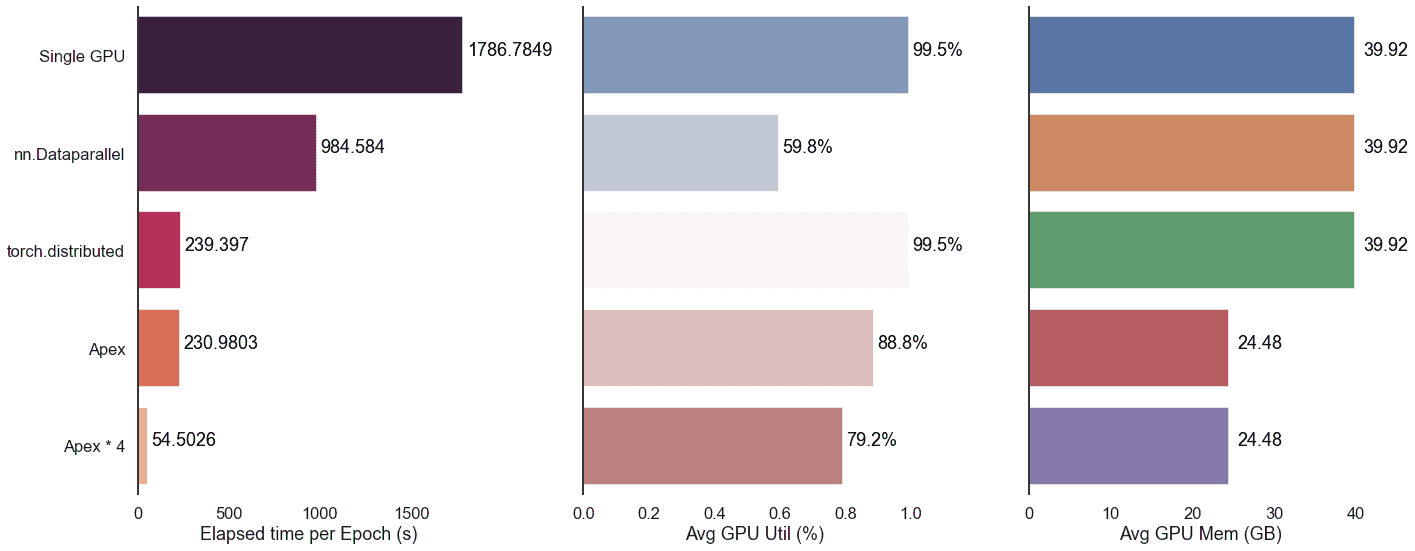
To fully utilize the video memory, herebatch_sizeSet it to 400 and record the elapsed time per Epoch for comparison. We started with a single-computer, single-card test as the BASELINE, which took 1786 seconds up and down per Epoch.
The test results found thatParallel acceleration with half-precision adds the best results;DataParallel is slower and does not utilize video card resources as well, not recommended!;The acceleration from multiple machines and cards is significant. The overall results are as follows:
nn.DataParallel
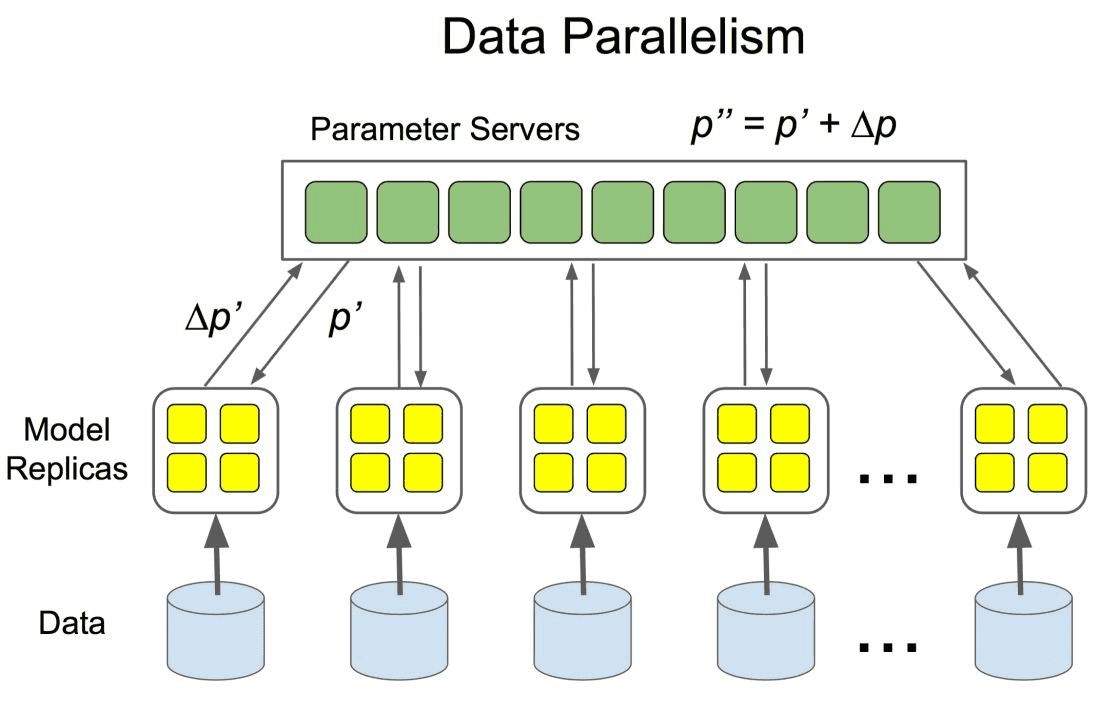
DataParallel is an early data parallel training method proposed by PyTorch, which uses single-process control to load models and data into multiple GPUs, control the flow of data between GPUs, and collaborate with models on different GPUs for parallel training.
It's very easy to use, we just need to use the nn.DataParallel Packaging model, and then set some parameters can be set. The parameters to be defined include:
- What are the GPUs involved in the training, device_ids=gpus;
- Which GPU is used to aggregate the gradients, output_device=gpus[0].
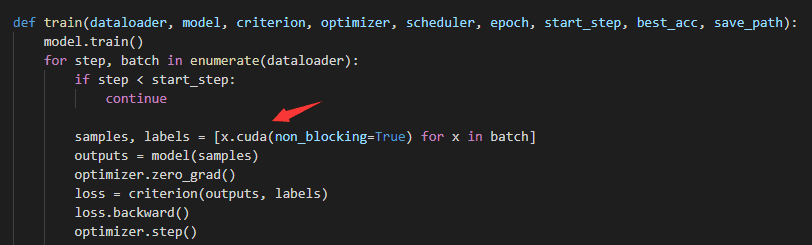
DataParallel automatically slices and loads the data to the appropriate GPUs, copies the model to the appropriate GPUs, and performs forward propagation to compute the gradient and summarize it:
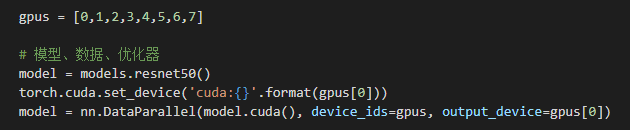
It is worth noting thatHere, because there are 8 video cards.**batch_size**To be set to 3200The models and data have to be loaded into the GPU before they can be processed by the DataParallel module. Both the model and the data have to be loaded into the GPU before the DataParallel module can process them, otherwise it will report an error.
Initiate training. As we can see from the figure below, the average GPU utilization of the 8 graphics cards is not high (36.5%) when the graphics memory is almost full.
 Looking at the utilization of each graphics card individually reveals uneven resource usage. One of the graphics cards, #0, is summarized as a gradient, with a little higher resource utilization compared to the other cards, and an overall utilization of less than 50%.

In the end.nn.DataParrallelUnder the method, ResNet average per EpochTakes 984sAround, compared to stand-alone single card accelerationAbout twice as effectiveThe
torch.distributed
After pytorch 1.0, PyTorch officially encapsulates common distributed methods, supporting all-reduce, broadcast, send and receive. It supports all-reduce, broadcast, send and receive, etc. It realizes CPU communication through MPI and GPU communication through NCCL, which solves the problems of slow speed of DataParallel and unbalanced load of GPU.
Unlike DataParallel's single-process control of multiple GPUs, with distributed we just write a single piece of code and the torch automatically assigns it to n processes running on n GPUs.
Specifically, first use the init_process_group Sets the backend and port used for communication between GPUs:
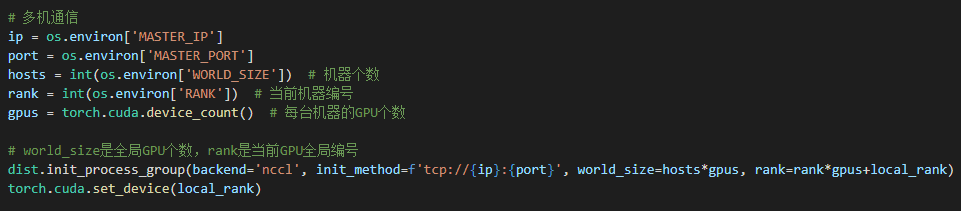
Then, use the DistributedDataParallel The wrapper model helps us to do all reduce (i.e., aggregate the gradients computed on different GPUs and synchronize the results) for the gradients computed on different GPUs. the gradient of the model on different GPUs after all reduce is the average of the gradients on each GPU before all reduce:
model = torch.nn.parallel.DistributedDataParallel(model.cuda(), device_ids=[local_rank])
Finally, because multi-process management is employed, it is necessary to use the DistributedSampler Partitioning the dataset helps us to divide each batch into several partitions, so that we only need to get the partition corresponding to the rank for training in the current process: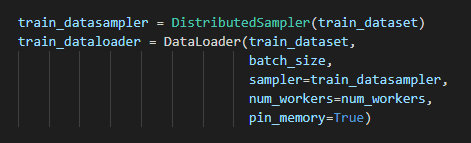
Noteworthy**, with ****nn.DataParrallel**Different. Here.**batch_size**It should be 400., since it is only responsible for the corresponding partition under the current rank, 8 cards make up a total batch_size of 3200 samples.
As for the API level, PyTorch provides us with the torch.distributed.launch A launcher for distributed execution of python files on the command line. During execution, the launcher passes the current process's (actually the GPU's) index to python via a parameter, and we can get the current process's index this way:
parser = argparse.ArgumentParser()
parser.add_argument('--local_rank', default=-1, type=int, help='node rank for distributed training')
args = parser.parse_args()
print(args.local_rank)
Start 8 command lines and execute the following commands:
CUDA_VISIBLE_DEVICES=0,1,2,3,4,5,6,7 python -m torch.distributed.launch --nproc_per_node=8 train.pytorch.multiprocessing
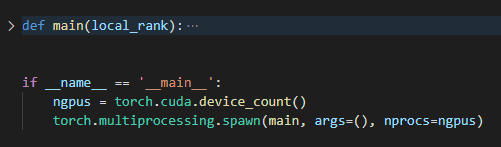
Starting the command line manually is a bit of a hassle, so here's an easier way to do it:torch.multiprocessing will help create processes automatically, bypassing the torch.distributed.launch Some glitches in the automatic control of opening and exiting processes.
As shown in the code below, the code that would otherwise require torch.distributed.launch The managed implementation is encapsulated into the main function by means of the torch.multiprocessing.spawn nprocs=8 processes are opened, each of which executes the main and pass local_rank (the current process index) into it.
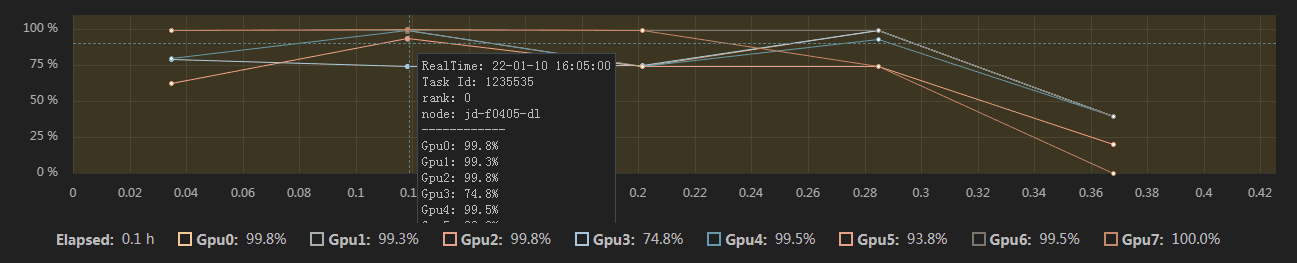
Initiate training. As we can see from the graph below, the video memory is almost fully occupied and the average utilization of the 8 cards is high (95.8%).

At the same time, each video card is more fully utilized, with a utilization rate of 80% or more:
In the end.torch.distributedUnder the method, ResNet average per EpochTakes 239sAround, compared to stand-alone single card accelerationAbout eight times more effective.The
apex
Apex is NVIDIA's open-source library for mixed-precision and distributed training, which encapsulates the process of mixed-precision training and allows you to change two or three lines of configuration to perform mixed-precision training, which significantly reduces memory usage and saves computing time. In addition, Apex also provides a package for distributed training, optimized for NVIDIA's NCCL communication library, which has been natively supported since PyTorch version 1.6, namelytorch.cuda.ampThe
Direct use amp.initialize Packaging the model and optimizer, apex will automatically help us manage the model parameters and optimizer precision, and other configuration parameters can be passed in depending on the precision requirements.
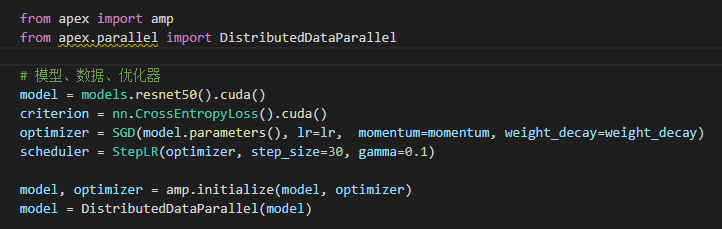
In terms of packaging for distributed training, Apex has not changed much, mainly optimizing NCCL communication. As a result, most of the code is still the same as the torch.distributed Keep it consistent. To use it, you just need to set the torch.nn.parallel.DistributedDataParallel Replace with apex.parallel.DistributedDataParallel Used for packaging models.
For forward propagation to compute the loss, Apex needs to use the amp.scale_loss Package for automatic scaling of accuracy based on loss values:
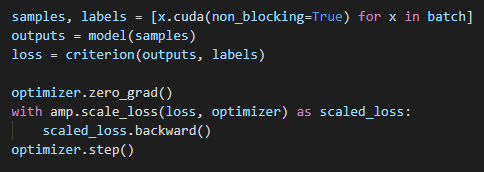
Initiate training. As we can see from the figure below, on an equalbatch_szieconditions, the video memory occupied only 601 TP3T, while the average utilization of the 8 video cards was high (95.81 TP3T).

At the same time, each video card is more fully utilized, with a utilization rate of 80% or more:

In the end.apexUnder the method, ResNet average per EpochTakes 230sAround, compared totorch.distributedAccelerated a bit. At the same time.apex also saves the GPU's arithmetic resources, which corresponds to the ability to set a larger batch_size for faster speeds. Under our extreme testing, the ability totorch.distributedThe base is boosted by about 50% of performance.
Multi-computer, multi-card training acceleration
As you can see from the test above, 8 cards give an approximate 8x speedup. If we use more machines, will there be a faster speed-up effect? Here, we are interested in the apexThe code, configured with 4 nodes and a total of 32 A100 GPUs for the experiment, yielded amazing results.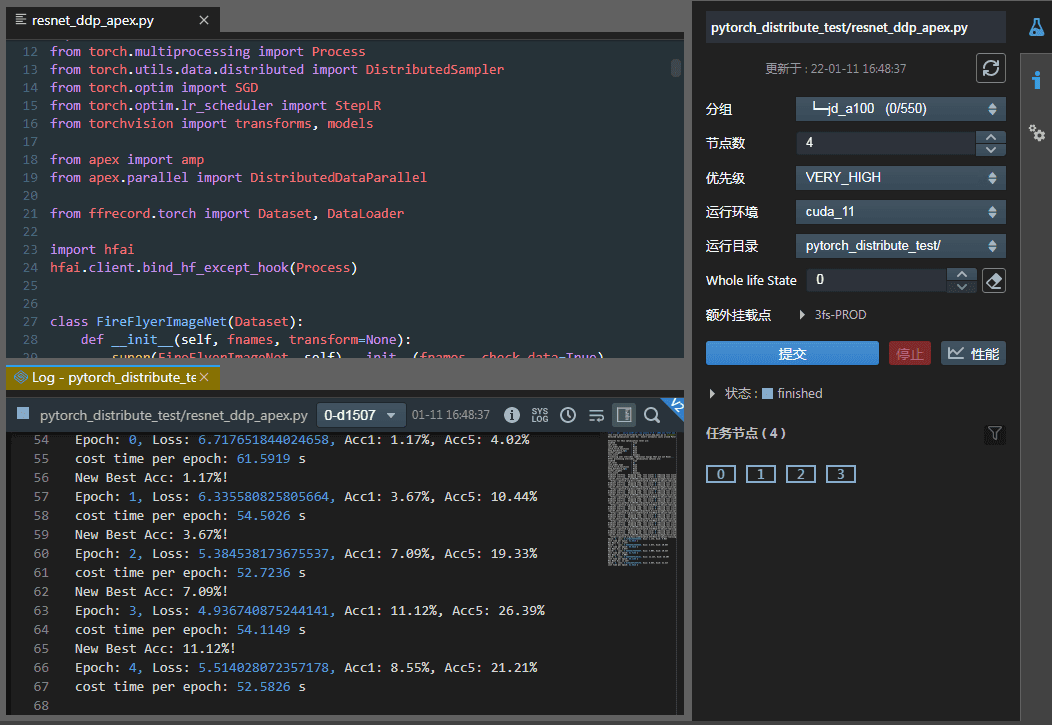 As can be seen.Total time per Epoch is about 52 seconds.Compared to stand-alone single-card speedsMore than 30 times higher, almost in line with the number of graphics cards.
distributed evaluation
The above shows the process of distributed training. However, it is also very important to ask how to reason and test the results of the training quickly, for example:
- The training sample is sliced into several parts, controlled by several processes running on several GPUs respectively, how to communicate between the processes to summarize this information (on the GPUs)?
- It's too slow to reason and test using a single card, how can you reason and test in a distributed way using Distributed and aggregate the results together?
- …
To solve these problems, we need a more basic API thatAggregate information about the accuracy, loss function and other metrics generated on different GPUsThe API is torch.distributed.reduce. This API is torch.distributed.reduce.
APIs such as reduce are torch.distributed These APIs help us control the interaction between processes and the transfer of GPU data. These APIs are useful for customizing GPU collaboration logic and aggregating small amounts of statistical information between GPUs. Proficiency in these APIs can also help us design and optimize our own distributed training and testing processes.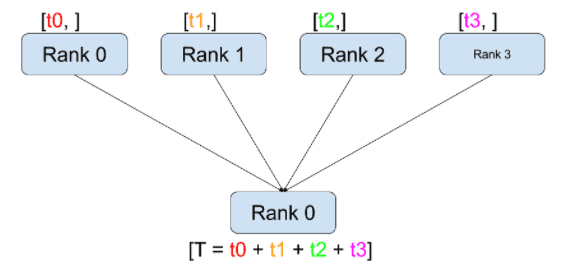
As shown in the figure above, its working process consists of the following two steps:
- After calling reduce(tensor, op=...), the current process accepts the tensor from the other process.
- After all receipts are complete, the current process (e.g., rank 0) performs an op operation on the current process's and the received tensor.
With the above steps, we are able to sum the loss functions of the training data on different GPUs:
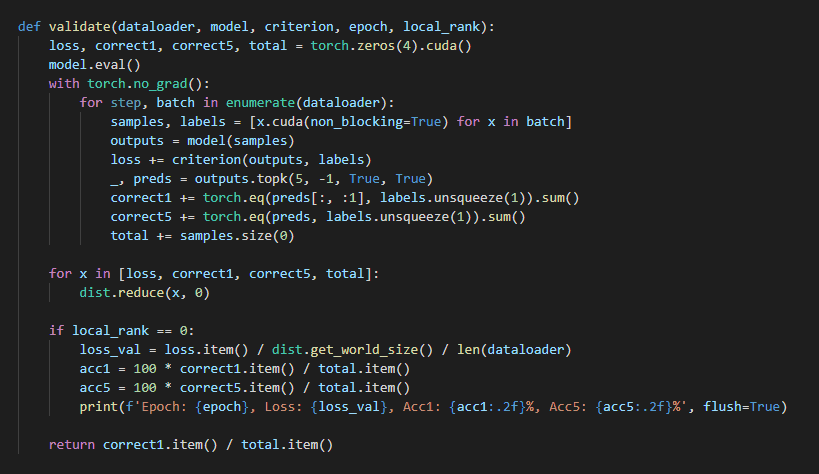
apart fromreduceThe official PyTorch website offers such features as the scatter, gather, all-reduceThere are 6 types of aggregate communication schemes, such as the following, refer to the official documentation for details: https://ptorch.com/docs/1/distributed
summarize
This paper introduces different PyTorch parallel training methods and tests them on Phantom Firefly II. From the test results, we can conclude that multi-computer and multi-card parallel training can effectively improve our efficiency, and the apex method combined with torch.distributed can maximize the arithmetic power of the graphics card, so that the acceleration effect is consistent with the number of graphics cards. At the same time, we also found that with the increase in the number of graphics cards, the utilization rate of a single graphics card will gradually decrease due to the restriction of reduce computation in gradient convergence. How to efficiently optimize the reduce algorithm to increase the gpu power as much as possible, so as to accelerate the overall training efficiency, is the next topic worthy of your continued research.