

Phantom AI has released its years-long sedimentaryDeep Learning Suite hfai It has attracted many peer researchers and developers to inquire about the trial. The whole suite has more functions, and after familiarizing with this set of rules, it is possible to easily call up the platform's arithmetic resources, so as to efficiently complete the training task.
To this end, we have created the “hfai use of the heart” series of albums, episodes one after another to introduce you to the hfai some of the functions of the design ideas and principles, to help you better and faster to learn the heart, with hfai this set of “magic skills” easily The hfai is a set of "divine powers" that can be used to easily deal with the challenges of deep learning assignments, so that the weight of the work can be lifted easily, and the examples can be used.
The last two moves introduced you to the hfai workspace 和 haienvIt can help users to quicklySynchronize local (PC, personal cluster, etc.) project directory (code, data), environmentTo remote clusters. This set of combinations down, in fact, we can think of it as a “build up” and “boost” process, the next is the most central part of the “divine power”, this article will introduce you to hfai pythonIt can help everyoneEasily and quickly initiate and manage training tasks。
Usage Scenarios
如As described in previous articlesAfter users transfer local data, code, and environment to the remote firefly cluster, they can then submit tasks to train the model. However, how to Firefly cluster computing power evenly and reasonably allocated to different tasks, and how users can view the management of their own tasks?
All of these functions can be accessed through the hfai python to realize.
basic concept
Some basic concepts are introduced before they are used.
Phantom AI presents theTask-level time-sharing schedulingthe concept of managing firefly clusters.Arithmetic power is allocated in terms of tasks rather than users. Users are free to submit tasks and apply for arithmetic scale freely, and the resources are uniformly allocated by the cluster scheduling system. As shown in the figure below:
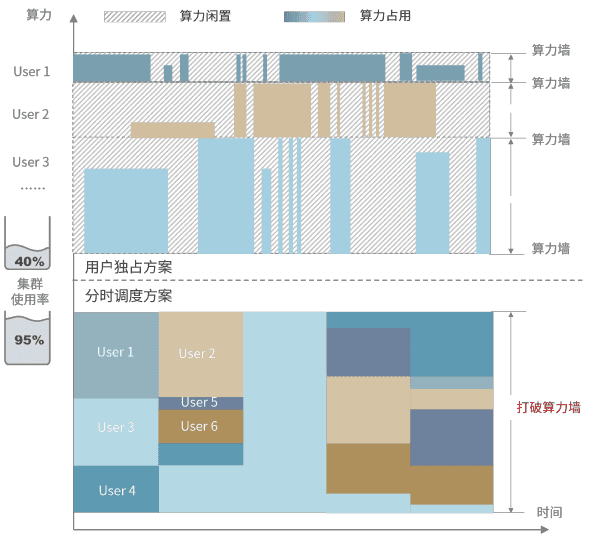
Computing resources are sliced and diced in the time dimension, and computing power is allocated to different tasks. This approach not only improves the overall utilization rate of the cluster, but also facilitates users to flexibly scale the card for different tasks, so that everyone has the opportunity to call on large-scale computing power for AI research.
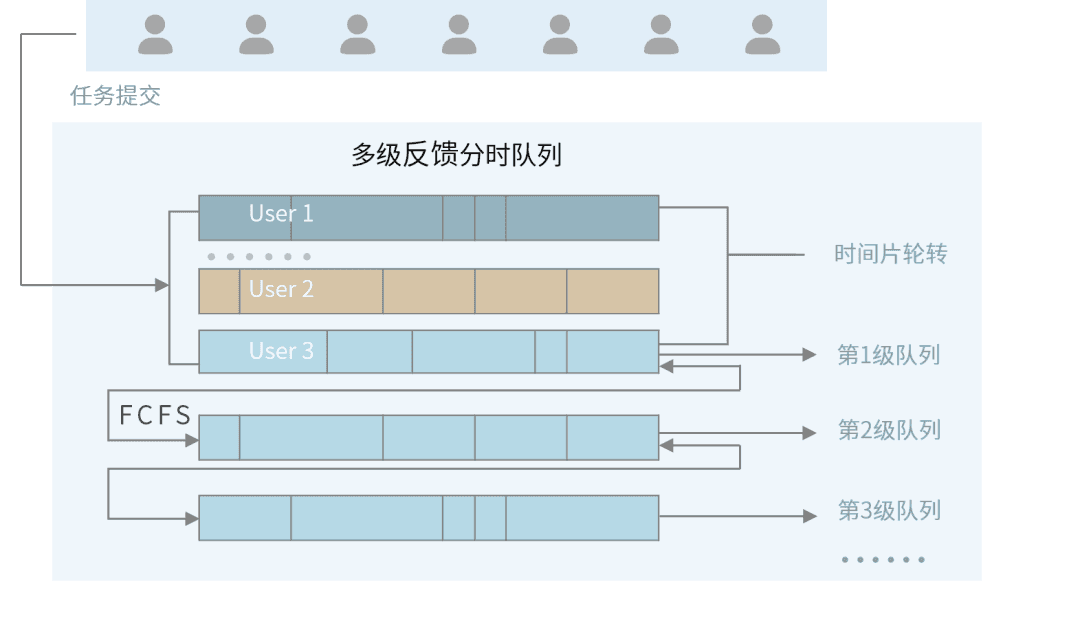
On the Firefly cluster, training tasks are prioritized, with higher priority tasks able to preempt lower priority arithmetic resources. Tasks within the same priority level are organized as “first come first served”The principle of providing arithmetic resources. hfai provides a number of convenient tools (for example:hfai.client,hfai.checkpoint) to facilitate your code during the training processReceive cluster scheduling information, set breakpoints for saving。
Local Code Debugging
In general, we normally perform deep learning training, such as training the Bert:
python bert.py -c large.ymlWhen you need to train a model using phantom firefly, you can debug locally to fix the problem before submitting it to a cluster run. hfai provides signals to simulate interruptions to help you test the suitability of the cluster run method, as in the following example:
hfai python bert.py -c large.yml ++ --suspend_seconds 100 --life_state 1here are
++This marks the current task as a local debugging simulation.---suspend_secondsIndicates how many seconds to send an analog interrupt signal.--life_stateIndicates the training position of the task record, this value can be set by the user in the code, for details refer to thehere are。
In this way, you can test whether your training code can accurately receive interrupt signals from the cluster, save breakpoints in the model, and continue to execute at the current breakpoint when the next task is pulled up.
Submission of mandates
Once you have completed local debugging, you are ready to submit the task to Firefly with the following command:
hfai python bert.py -c large.yml -- --nodes 1 --name train_berthere are
--This flags that the task is currently being submitted.--nodesindicates how many nodes are used for training, hereThe task assigns a minimum of 8 A100s to a nodeIf your task doesn't require that many graphics cards, you can set it in the code--nameIndicates the naming of the current task.
It is important to note thatExternal free users do not need to be prioritized --priorityThe cluster automatically allocates idle arithmetic to schedule tasks. Of course, if you need high-priority training tasks that are not interrupted, you can contact Mirage to discuss commercialization.
task management
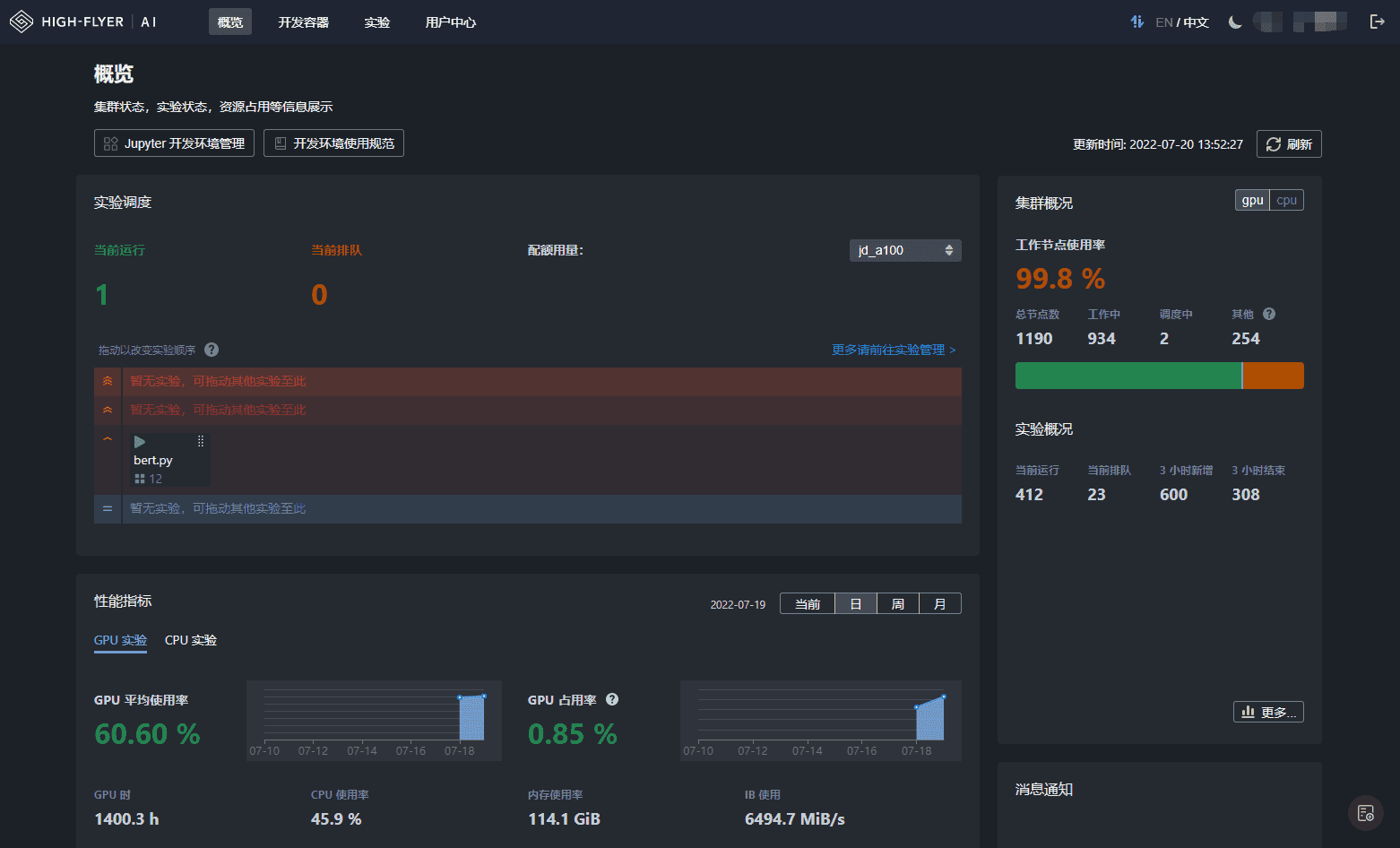
After the task has been submitted successfully, you can studio You can see the status of your tasks in the following screenshot. As you can see in the image below, the interface shows the submitted task, the GPU and CPU utilization of the task, and the overall busyness of the cluster.
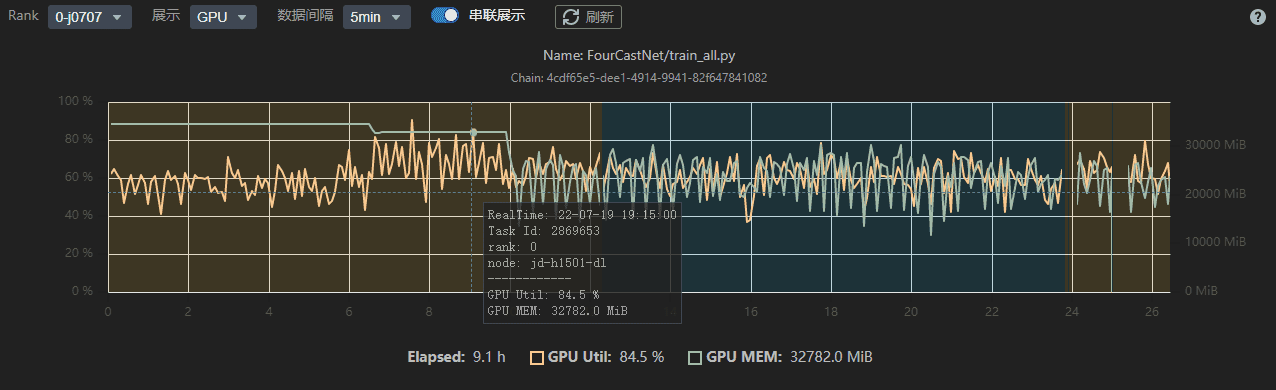
You can also get the training status of the task at each time, as shown below, for better management and tuning of the deep learning model.
In addition to starting and stopping tasks and viewing logs on the studio page, you can also use the hfai suite of tools on your local computer terminal. In addition, with the hfai python Similarly, Phantom AI provides hfai bash suite, which meets the needs of users who want to manage their training tasks in a granular way with bash scripts. More information can be found in theofficial document。